

You built an AI or machine learning application on your laptop. The notebook runs, the API returns an answer, and the demo looks ready to share. Then a teammate clones the project—and it fails. Or you deploy it to a remote server, where it behaves differently.
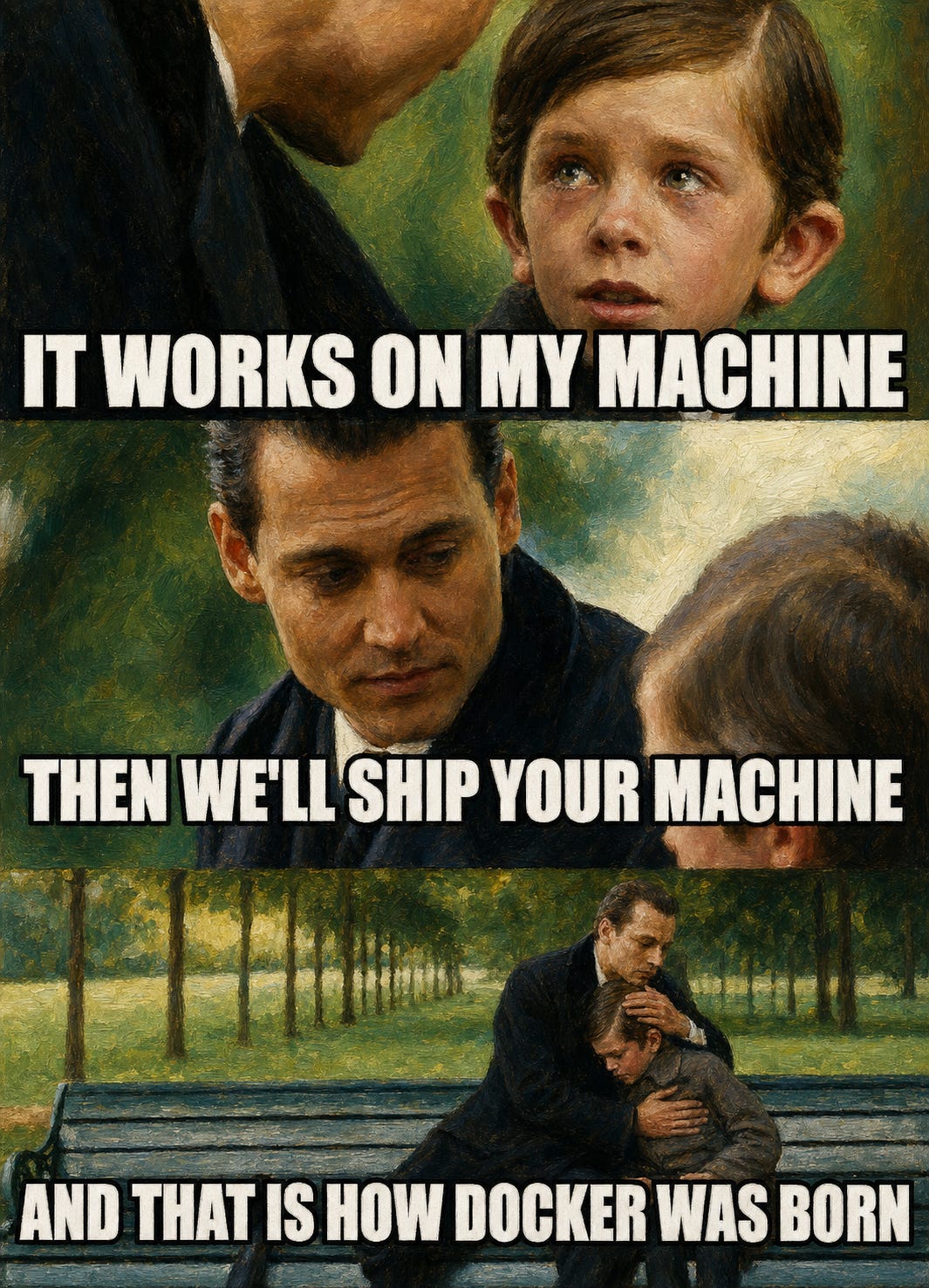
This is the classic “it worked on my machine” problem. More broadly, it is a reproducibility problem.
I first encountered the term reproducibility during my bachelor’s degree. At the time, I understood it mainly as setting a random seed so that an experiment would produce the same results every time. My favorite seed is still 12345.
In practice, reproducibility takes several forms.
In data science, it often means obtaining the same statistical or machine learning results when the data, code, configuration, and other inputs remain unchanged. In data engineering, it can mean producing the same output when a pipeline processes the same raw data. In DevOps and MLOps, it includes the ability to deploy software or models into another environment and get the behavior you expect.
What makes a project difficult to reproduce? Common causes include:
Code version — Reproducing a result starts with knowing exactly which version of the code was used. Git and platforms such as GitHub and GitLab help track and share those changes.
Randomness — Many statistical and machine learning operations use random numbers. Setting a seed helps control this source of variation, although it does not guarantee complete reproducibility.
Software versions — Your Python or R version and the versions of installed dependencies can change how the code behaves. For example, code written for pandas 1.x may fail with pandas 2.x if it relies on an API that was removed.
Operating system — Packages may depend on platform-specific binaries, compiled extensions, system libraries, and other OS components. Differences between operating systems—or even between versions of the same OS—can affect installation and execution.
Hardware — CPU architecture, accelerators such as GPUs, and platform-specific numerical libraries can also influence compatibility, performance, and, in some cases, results.
Version control helps ensure that everyone can run the same code. But what about the environment in which that code runs? A virtual environment can isolate and pin Python or R dependencies, but it does not reproduce the operating system, system libraries, or other runtime components.
This is where Docker comes into the picture.
Docker packages an application and its runtime dependencies into a container image. You can use that image to develop and test locally, share the application with teammates, and deploy it to a server or cloud platform—with far fewer environment-specific surprises.
Docker does not eliminate every source of variation, particularly hardware differences and external dependencies, but it gives the application a much more consistent environment in which to run.
What is Docker?
Docker is a framework for building, distributing, and running applications as containers. The important word here is framework. Docker is not the container itself, and a container is not simply a small virtual machine. Docker provides a workflow and a set of tools for turning an application environment into an artifact that can be built, shared, and run repeatedly.
A container is an isolated process running on a host. It has its own view of the filesystem, processes, and network, but—unlike a virtual machine—it does not include a separate operating-system kernel. Linux containers running on the same host share the host's Linux kernel. The files available to the process come from a container image: a read-only, versioned package containing the application code, language runtime, libraries, system tools, and default startup configuration.
The distinction between an image and a container is important:
An image is the packaged definition of an environment. You build it once and can store or distribute it.
A container is a running instance of that image, combined with runtime settings such as environment variables, mounted storage, ports, and network connections.
You can start multiple containers from one image, just as you can create multiple running processes from the same executable. Changes written inside a container are temporary unless you deliberately store them in a volume or an external system. This separation encourages you to treat the image as a reproducible artifact and keep persistent data outside it.
The Docker workflow
Several Docker components work together to move an application from source code to a running process:
Dockerfile: A version-controlled recipe describing how to assemble the application environment.Docker Engine: Builds images and creates, runs, and manages containers.
Image: The immutable package produced by a build.
Registry: A service—such as Docker Hub or a private registry—that stores and distributes images.
Container: A running instance of an image with runtime configuration attached.
Volumes and networks: The mechanisms used to persist data and connect containers to other services.
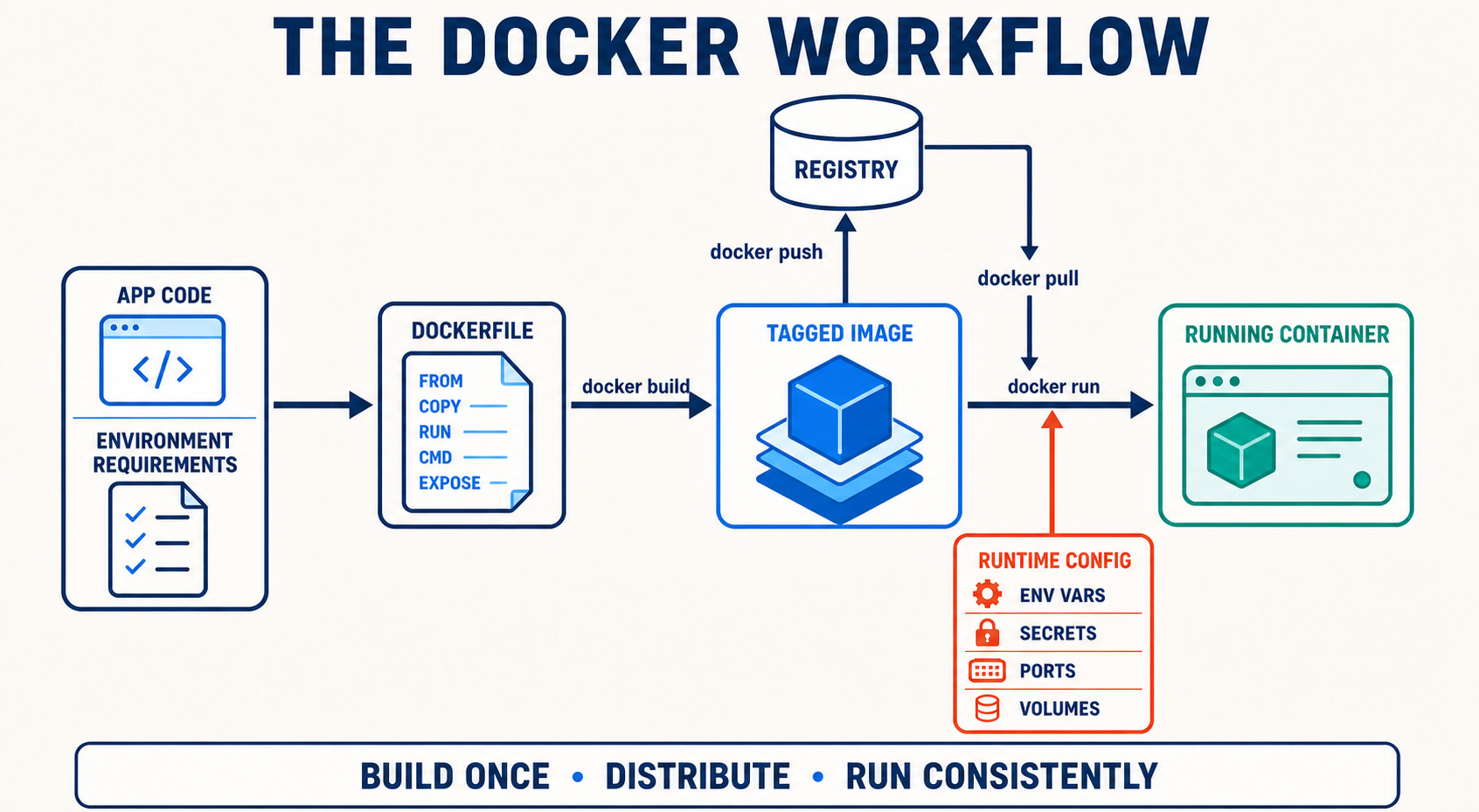
In practice, the workflow looks like this:
You define the environment in a Dockerfile alongside the source code.
Docker builds that definition into a tagged image.
You test the image and optionally publish it to a registry.
A teammate, CI runner, or server pulls that image and starts a container from it.
Environment-specific values—such as secrets, storage locations, ports, and service addresses—are supplied when the container runs rather than baked into the image.
This is what the diagram below represents: the build produces one image, the registry distributes it, and each environment runs a container from the same artifact. Configuration can change between local development, CI, and production, but the packaged application does not have to be rebuilt for each destination.
What is Docker useful for?
Docker is especially useful when an application needs to move between people or environments:
Reproducible development environments: New contributors can start from a defined runtime and dependency set instead of reconstructing one from setup notes.
Repeatable testing and CI: Automated tests can run against the same image that is being evaluated for release.
Application delivery: A tested image becomes a versioned release artifact that can be deployed to a compatible server or cloud platform.
Local supporting services: Databases, vector stores, queues, and observability tools can run without being installed directly on the laptop.
Multi-service AI systems: An API, worker, vector database, and local model service can run in separate containers with explicit boundaries between them.
Sandboxed AI workloads: AI agents and experimental applications can run in isolated containers with controlled dependencies, filesystem mounts, network access, and resource limits.
Disposable execution environments: Short-lived jobs, experiments, and agent tools can run with controlled dependencies and be removed afterward.
When should you use Docker?
Docker is a strong fit when the application depends on more than a few language packages, multiple people need to run it, CI must reproduce it, or the intended deployment platform accepts containers. It is also useful when you want to run a database or another service locally without permanently changing the host machine.
Docker may be unnecessary for a one-off notebook that will remain on one computer, or for a small Python project whose only requirement is isolating a few packages. In those cases, a virtual environment may be the simpler tool.
Docker is also not a complete production platform by itself. It does not remove differences in CPU architecture, GPU availability and drivers, storage, networking, or host security. It does not automatically manage secrets, backups, monitoring, or multi-server scaling. Those concerns still require deliberate configuration and, in larger systems, additional platforms or services.
The practical question is therefore not “Should every project use Docker?” It is “How much of this application’s environment needs to be defined and moved with it?” For Python developers, that leads naturally to the next question: doesn’t a virtual environment already solve this problem?
Isn’t that what a virtual environment does?
Python virtual environments are useful. I use them regularly. They isolate a project’s Python packages so that, for example, one project can use a different library version from another project.
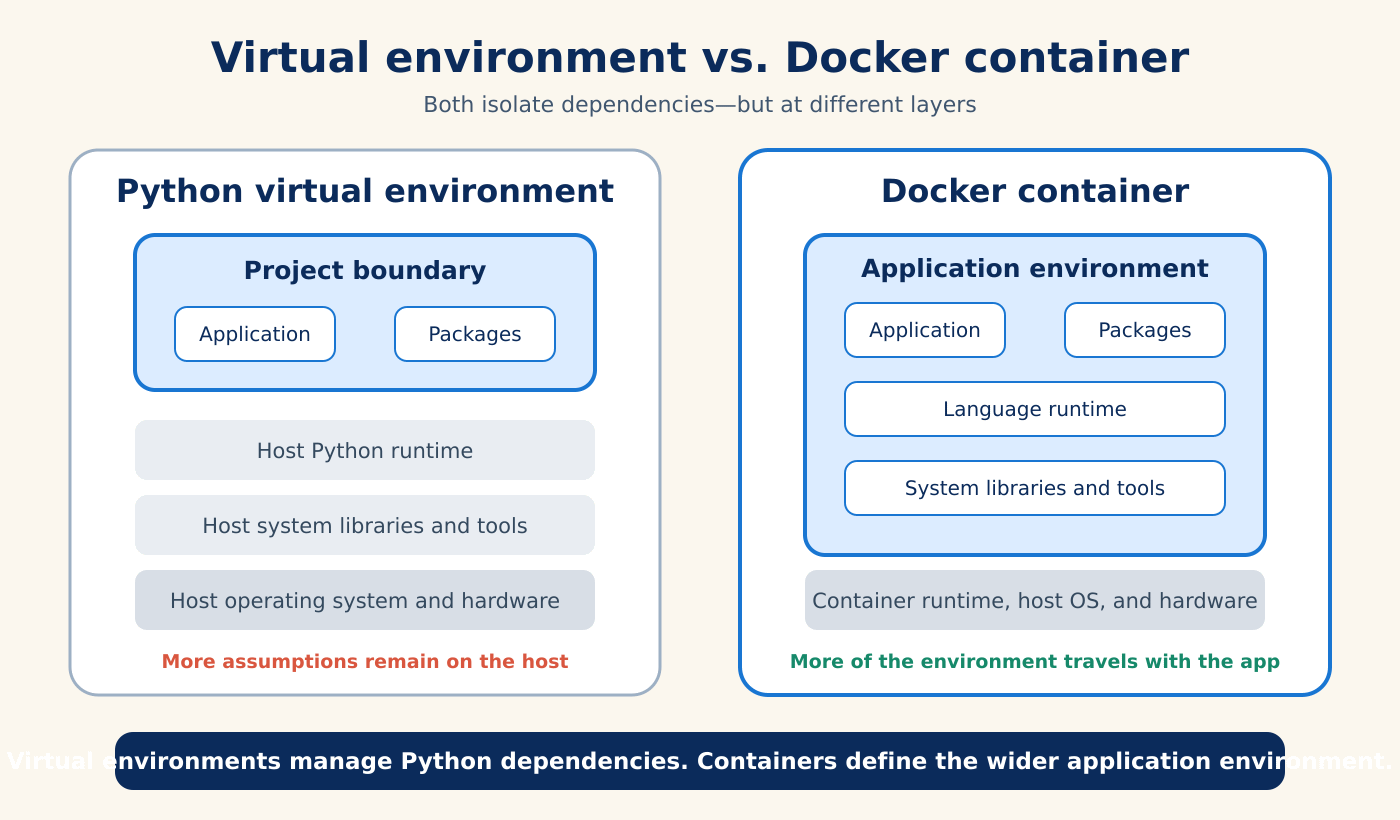
But a virtual environment is created on top of an existing Python installation and operating system. It does not fully define the environment outside the Python package layer.
Python packagesOperating-system packagesPackage versionsSystem libraries and command-line tools A project-specific Python environmentHost permissions and filesystem layoutPython-level dependency isolation External services, ports, and networks CPU architecture, GPU drivers, or other hardware constraints
A virtual environment may be enough for local Python work. The gap appears when the application depends on more than Python packages—which is common for AI and data workloads.
What changes on an external server?
Consider an application that works on a developer’s laptop. An external server may have:
A different operating system or CPU architecture;
A different Python version;
Missing system libraries or executables;
Different paths, users, and file permissions;
No copy of the local model or data cache;
Different environment variables and secret-management rules;
Another process is already using the expected port, or
No vector database or supporting service at the assumed address.
Even when the application uses a hosted model API, the surrounding code still runs in an environment. The client library, document parser, web server, database driver, and authentication configuration all need to work together.
A dependency file such as requirements.txt helps, but it cannot describe this complete system by itself.
Why develop inside a container?
Containers are often introduced as a deployment tool. For me, their value starts earlier—during development.
When the development environment is defined as code, it becomes part of the project rather than a collection of manual steps on one laptop. This provides several practical benefits:
Reproducibility: Rebuild the environment from a versioned definition.
Collaboration: Give teammates the same starting point instead of asking them to recreate your machine.
Isolation: Keep project dependencies from colliding with other projects or cluttering the host system.
Faster onboarding: Encode setup decisions in project files rather than a long installation checklist.
Testing parity: Run development and CI against the same environment definition you intend to ship.
A clearer delivery path: Publish the tested image to a registry and run that version on a compatible external system.
The goal is not to make development and production identical. Development may include editors, notebooks, debuggers, or mounted source code that should not be present in a production image. The goal is to make their relationship explicit and controlled.
Summary
Docker helps replace an environment that exists only on one machine with a versioned definition that can be built, shared, and run repeatedly.
In this tutorial, we established several important distinctions:
An image is a packaged definition of an environment; a container is a running instance of that image.
A Python virtual environment isolates language packages, while a container defines a wider application environment that can include the runtime, system libraries, and command-line tools.
Developing inside a container improves reproducibility, collaboration, onboarding, testing parity, and the path toward deployment.
Docker reduces environment-specific surprises, but it does not eliminate hardware differences, external dependencies, or the need for deliberate security and production configuration.
In the next tutorial, we will follow the Docker workflow from defining an application’s requirements and translating them into a Dockerfile to build an image and run it as a container.
If you want a guided course that covers the Docker foundation now, my LinkedIn Learning course—Docker for Local AI App Development: Build Lightweight, Containerized AI Applications—walks through the workflow from reproducible development to testing and production preparation.